Wesecuu Security Cameras

Wesecuu makes two genuinely different types of security camera — a WiFi bulb camera that screws into a standard E27 or E26 socket in under 10 minutes, and wired 4K PoE systems that run on a dedicated Ethernet network independent of your home WiFi. Both record locally for free: bulb cameras to a microSD card (up to 128GB), PoE systems to a pre-installed hard drive. No monthly fee to watch live footage or save motion events. The flagship 2K bulb camera holds #17 in Amazon's Dome Surveillance Cameras category with 4,243 reviews — which, in a category full of look-alike generic listings, is a real signal worth paying attention to.

✓ Free Local SD Recording✓ Screws Into Any E27 Socket✓ 4K Wired PoE Systems
Shop WESECUU Cameras on Amazon
WESECUU Light Bulb Security Camera -5G& 2.4GHz WiFi 2K Security Cameras Wireless Outdoor Motion Detection and Alarm
Record 24/7 Without Paying Monthly Record 24/7 Without Paying Monthly

WESECUU cameras save footage locally — microSD card (up to 128GB) for bulb cameras, pre-installed HDD for PoE systems — with no subscription required to record or view.

Screws Into Your Existing Light Socket Screws Into Your Existing Light Socket

The E27/E26 screw-in format means zero drilling, zero tools — just thread the camera into any standard porch, garage, or lamp fixture and you're done.

Alerts Only When a Person Appears Alerts Only When a Person Appears

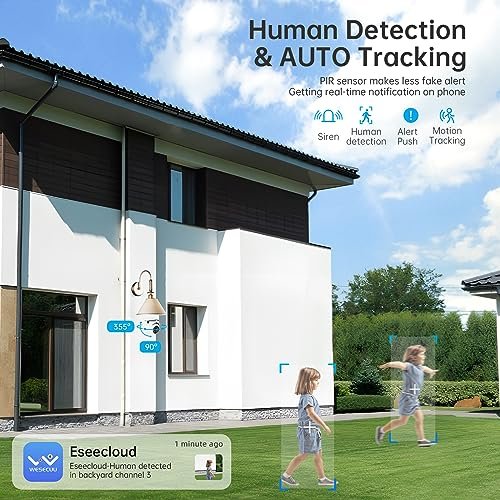
AI human detection filters out bugs, leaves, and passing headlights — push alerts go to your phone only when the camera identifies an actual person, with delivery under 10 seconds.

Two Systems for Two Different Situations Two Systems for Two Different Situations

WiFi bulb cameras for renters and quick installs; 4K PoE wired NVR systems for homeowners who want permanent, tamper-resistant coverage with 100-foot night vision and no WiFi dependency.

WESECUU WiFi Bulb Cameras — Three Options

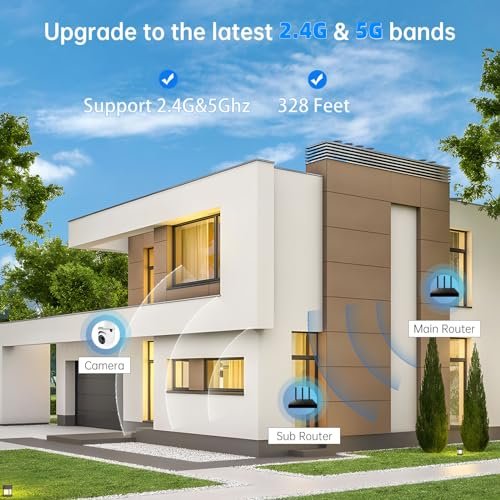
All three bulb cameras share the same screw-in E27 format, dual-band 5GHz/2.4GHz WiFi, 355°/90° PTZ range, and EseeCloud app — the differences come down to how many you need and how much resolution matters for your specific situation.

WESECUU Light Bulb Security Camera -5G& 2.4GHz WiFi 2K Security Cameras Wireless Outdoor Motion Detection and Alarm

2K Bulb Camera (Single)

The flagship single-unit bulb camera: 2K/3MP resolution, IP65 waterproof rating, color and IR night vision up to 33 feet, 355°/90° PTZ, and dual-band WiFi that reduces the video lag and dropout common on older single-band cameras. Weighs 0.27 kg and measures 2.76 inches long — compact enough to disappear into most fixtures. Records continuously to a microSD card up to 128GB with no subscription, and works with Amazon Alexa for voice-activated live view.

The most-reviewed WESECUU camera with 4,243 ratings — the right starting point if you need reliable single-zone coverage without drilling a single hole.

See on Amazon
Light Bulb Security Camera -5G& 2.4GHz WiFi 2K Security Cameras Wireless Outdoor Motion Detection and Alarm

2K Bulb Camera (4-Pack)

Four of the same 2K dual-band cameras in one box, each with its own E27 socket adapter included. All four cameras connect to the same EseeCloud app and can be monitored simultaneously — useful for covering a front porch, side gate, driveway, and backyard without purchasing a wired NVR system. Same 355°/90° PTZ, color night vision, AI humanoid detection, and 128GB microSD support as the single-unit model.

Four zones covered with zero drilling — the practical choice for homeowners or landlords who want multi-point wireless coverage managed from one app.

See on Amazon
WESECUU 3K Light Bulb Security Camera -5G& 2.4GHz WiFi Security Cameras Wireless Outdoor Motion Detection and Alarm

3K Bulb Camera Ultra HD

The higher-resolution option in the bulb camera lineup: 3K (~5MP) versus the 2K standard model. Same E27 socket format, same 355°/90° PTZ range, same dual-band WiFi and EseeCloud app — the upgrade is purely in image detail. That extra resolution matters most when the camera is watching a driveway or street-facing fixture where you might need to identify a license plate or read a face at distance. Night vision range stays at 33 feet with the same color and IR modes.

If you're placing a bulb camera where identifying vehicles or faces at a distance matters, the 3K model gives you meaningfully more detail to work with than the standard 2K.

See on Amazon
WESECUU Poe Security Camera System

4K PoE System 4-Camera

A 4-camera wired PoE system built around an 8-channel NVR with 1TB pre-installed HDD storage. Each camera runs 4K resolution with IR night vision reaching 100 feet — three times the range of the WiFi bulb cameras. AI detection identifies people, animals, and vehicles and claims 99% fewer false alarms compared to traditional PIR-based motion detection. An e-SATA port lets you add up to 6TB of external storage if the 1TB fills up. Two-way audio is included. No WiFi required to record.

The entry point into WESECUU's wired lineup — 4 permanent cameras, local 4K recording, and night vision to 100 feet, with no monthly fees and no dependence on your home network.

See on Amazon
WESECUU Poe Security Camera System

4K PoE System 8-Camera

Eight 4K PoE cameras plus an 8-channel NVR with 3TB of pre-installed HDD storage — the largest local storage capacity in WESECUU's lineup. Wide-angle lenses, 100-foot IR night vision, and the same AI person/animal/vehicle detection as the 4-camera system. The NVR includes HDMI and VGA outputs, so you can connect a monitor directly for on-site viewing without using the app. Same e-SATA expansion port for up to 6TB additional external storage. Built for properties that need coverage across 7 or 8 distinct zones simultaneously.

Full-property coverage at 4K with 3TB of local storage and no subscription — the right system for larger homes, small businesses, or rental properties with multiple zones to monitor.

See on Amazon

Bulb Camera vs PoE — Which Fits Your Setup

WESECUU Light Bulb Security Camera -5G& 2.4GHz WiFi 2K Security Cameras Wireless Outdoor Motion Detection and Alarm

The honest answer depends on four things: whether you rent or own, how many zones you need to cover, how reliable your home WiFi is, and whether you're willing to run Ethernet cable. Neither system is universally better — they solve different problems for different people.

Choose the Bulb Cameras If...

  • You rent and can't drill holes or modify the property — the E27 screw-in format requires zero permanent changes
  • You need one to four cameras up and running tonight, not this weekend
  • Your WiFi router is within reasonable range of the fixtures you want to cover
  • You want the option to take the cameras with you when you move
  • You're covering specific spots (front porch, garage, side gate) rather than a whole property perimeter

The 2K single unit weighs 0.27 kg and measures 2.76 inches long — it disappears into most fixtures. The 4-pack covers four zones simultaneously from one EseeCloud app account, with no NVR required and no cable to run.

Choose the PoE System If...

  • You own your home and want a permanent installation that doesn't depend on WiFi staying online
  • You've had wireless cameras drop off the network before and you're done with it
  • You need coverage across 4 to 8 distinct zones — a perimeter, not a spot
  • You want footage stored locally on a hard drive (1TB on the 4-cam, 3TB on the 8-cam) rather than a small SD card
  • Night vision range matters — the PoE cameras reach 100 feet in IR mode versus 33 feet on the bulb cameras
  • Physical tamper resistance is a priority — a mounted PoE camera requires tools to remove; a bulb camera just unscrews

The PoE setup takes longer. Running Ethernet cable through walls or along exterior soffits is the hard part — the NVR configuration itself is straightforward, and WESECUU includes a step-by-step setup video that covers the full process. Budget an afternoon for a 4-camera install if you're routing cable through two or three walls.

The One Situation Where People Get It Wrong

The most common mistake is buying the PoE system hoping to avoid the WiFi bulb camera's app — then discovering the PoE system uses its own app for remote viewing and requires internet access for that too. Local recording on the NVR happens without internet. Remote viewing from your phone does not. Both systems have an app component. The difference is that the PoE system records to a hard drive whether your internet is up or not, while the bulb cameras need WiFi for both recording and remote access.

If you're still on the fence: renters almost always want the bulb cameras. Homeowners who've already tried a WiFi camera and been frustrated by dropouts or limited storage almost always want the PoE system.

What These Cameras Do Well — and Where They Don't

WESECUU's bulb cameras earn their 4.2-star average honestly — the core functions work. But there are real friction points that show up consistently in aggregated review data, and you'll run into them if you buy. Better to know now.

Where the Bulb Cameras Deliver

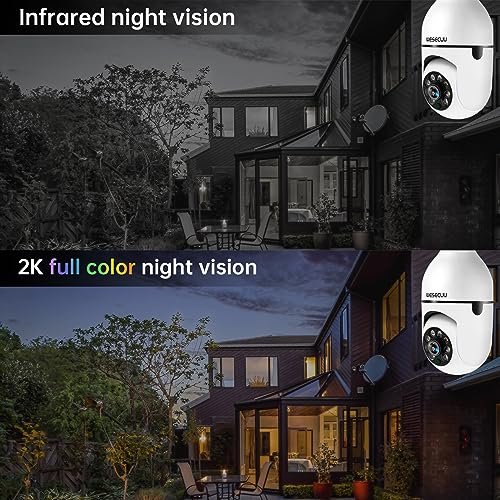
Night vision is the standout. Both color mode (low ambient light) and IR mode (complete darkness up to 33 feet) get consistent praise in independent testing — the ShopSavvy aggregated review specifically called out the IR illumination and daytime picture quality as highlights. One reviewer compared the 2K image favorably to their Ring camera's quality. Alert speed is real too: motion-triggered notifications arrive under 10 seconds in most tested conditions, which is fast enough to actually pull up the live feed and see what's happening.

The screw-in format works exactly as advertised. No tools, no drilling — the E27 adapter fits standard US porch and garage fixtures, and the camera is live after a WiFi pairing that takes most users under 10 minutes from box to working alert.

Where You'll Hit Friction

The app experience is the most documented complaint. Three issues come up repeatedly: duplicate alert notifications (you get the same push twice), no direct jump from a notification to the specific motion event in recorded footage (you have to scrub manually), and the PC client has intermittent verification code issues that make desktop viewing unreliable for some users. The mobile app for live viewing and SD card playback works solidly — it's the edge cases where things get clunky.

WESECUU Light Bulb Security Camera -5G& 2.4GHz WiFi 2K Security Cameras Wireless Outdoor Motion Detection and Alarm

Audio through the two-way talk feature gets described as workable but thin. You can hear and be heard — don't expect it to sound like a phone call.

The Physical Security Problem Nobody Mentions in the Listing

A bulb camera in an accessible socket is easier to steal than any mounted camera. Someone can walk up and unscrew it in five seconds. This is a real concern raised in security camera communities, and ignoring it doesn't help anyone. The practical workaround: install in elevated fixtures, under eaves, or anywhere that requires a ladder to reach. For ground-level or eye-level sockets — a porch lamp you can reach while standing — the PoE wired system with a fixed mount is the more tamper-resistant choice.

Outdoor Exposure Limits

The IP65 rating means the cameras handle rain and humidity — but "outdoor rated" doesn't mean fully weatherproof in every position. The WESECUU documentation and consistent installer advice both point the same direction: mount under an eave or covered overhang, not in a fully exposed fixture with no overhead protection. Prolonged direct exposure to heavy rain, snow, or sustained direct sun shortens the camera's lifespan in ways the IP65 spec doesn't cover.

The PoE cameras don't have these limitations at the same level — fixed-mount outdoor housings with proper cable entry points handle exposure better than a screw-in bulb format by design.

How WESECUU Compares to Ring, Wyze, and Reolink

WESECUU competes in different ways against different brands. Against Ring and Wyze, the bulb cameras' no-subscription storage is the clearest advantage. Against Reolink in the PoE segment, the comparison is closer — and community perception matters there in a way it doesn't on Amazon.

WESECUU Bulb Cameras vs. Ring and Wyze

Ring's outdoor cameras require a subscription (Ring Protect, starting at a monthly fee) to save and review recorded footage beyond a brief live view window. Without a plan, you get live view only — no recorded history. Wyze offers a free tier with 14-day event recording via their Cam Plus Lite, but full 24/7 continuous recording requires a paid tier per camera.

WESECUU's bulb cameras record 24/7 continuously to a microSD card (up to 128GB) with no subscription at any level. That's not a minor difference in cost over a year or two of use — and for buyers who simply don't want a recurring bill, it removes a decision entirely. The trade-off: Ring and Wyze have better-developed apps with more polished interfaces, stronger third-party smart home integrations, and larger community support bases for troubleshooting.

WESECUU Light Bulb Security Camera -5G& 2.4GHz WiFi 2K Security Cameras Wireless Outdoor Motion Detection and Alarm

On PTZ capability, WESECUU has a genuine edge. The 355°/90° motorized pan/tilt lets you reposition the view remotely through the app — Ring's standard outdoor cameras are fixed-angle, and Wyze's fixed indoor cameras don't pan at all without buying the specific pan/tilt model. For covering a driveway or yard where the angle you need changes, that flexibility matters.

WESECUU PoE Systems vs. Reolink

Reolink is the brand r/SecurityCamera and r/homesecurity communities recommend most consistently for wired PoE systems. That community reputation is real and earned — Reolink has a large installed base, well-documented troubleshooting resources, and active forum support that WESECUU simply doesn't have at the same scale. If community knowledge and peer troubleshooting matter to you, Reolink has the stronger ecosystem.

On paper, WESECUU's 4K PoE systems are competitive: same resolution tier, comparable AI detection claims (99% false alarm reduction vs. PIR), local HDD recording without subscription, and similar camera counts at their respective price points. The 8-camera system ships with 3TB pre-installed versus Reolink's comparable systems which often come with 2TB at similar configurations.

Where WESECUU trails: fewer firmware update releases over time, a smaller independent review base to cross-reference against, and less community documentation for edge-case configurations like RTSP streaming or third-party NVR integration. If you want a standard install — cameras to NVR, NVR to hard drive, app for remote viewing — WESECUU works. If you want to run the cameras through Blue Iris, pull RTSP streams into Home Assistant, or integrate into a more complex network setup, Reolink and Unifi have better community documentation for that work.

The Bottom Line on Comparisons

Buy WESECUU bulb cameras over Ring or Wyze if eliminating subscriptions and getting PTZ flexibility are your priorities. Buy Ring or Wyze if app polish and smart home ecosystem depth matter more than storage costs. For the PoE systems: WESECUU is a capable option at its price point, but if community support and third-party integration matter, Reolink is the more documented choice in that tier.

WESECUU Camera Setup — From Socket to Live Feed

The bulb camera setup takes most people under 10 minutes from opening the box to receiving the first motion alert. Here's exactly what that process looks like — including the steps where things occasionally go sideways.

Step 1 — Install the Camera

The box includes one E27 socket adapter. If your fixture uses the standard US E26 base (slightly smaller diameter — found on most American porch and garage fixtures), the adapter handles the size difference. Power the socket off at the switch, thread the adapter in, screw the camera into the adapter, then restore power. The camera will run a short startup sequence — you'll hear a chime or see the status LED cycle. That means it's ready to pair.

Step 2 — Download the Right App

This is where some buyers lose time. WESECUU uses two apps depending on the product model. The 2K bulb camera (T-CP8040LF-W3M) and 3K model (T-CP8042LF-WSM) use EseeCloud — search that exact name in the App Store or Google Play. The most reliable way to confirm which app your specific camera needs: scan the QR code printed in the box. It takes you directly to the correct download link and skips any guessing. Don't search generically for "WESECUU" — multiple apps share similar names and the wrong one won't complete pairing.

Step 3 — Connect to WiFi

Open EseeCloud, create an account, and tap "Add Device." The app will prompt you to enter your WiFi password. One important note: during initial pairing, connect to your 2.4GHz network — even if your router broadcasts a combined 2.4/5GHz network with a single SSID. Some routers handle this automatically, but if pairing stalls at the connection step, switching manually to a 2.4GHz-only SSID usually resolves it. After the camera is paired and running, it will use the 5GHz band automatically when signal strength allows.

Step 4 — Adjust Detection Sensitivity Before Your First Night

Before you leave the camera running overnight, go into the EseeCloud settings for that device and set the human detection sensitivity. The default is often set high — which means you'll get alerts for large dogs, close-range heat sources, and occasionally bright headlights sweeping across the frame. Drop it one level from maximum and run it for a day before deciding whether to adjust further. This single step eliminates most of the false-alert complaints you'll read in reviews.

The AI human detection is looking for a full humanoid shape — it's not basic PIR motion triggering on anything that moves. But sensitivity calibration to your specific environment (busy street, backyard with trees, covered porch) makes a real difference in how useful the alerts actually are.

Step 5 — Insert a MicroSD Card

The camera records 24/7 to a microSD card — but the card is not included in the box. It accepts cards up to 128GB formatted as FAT32 or exFAT. Insert the card while the camera is powered (there's a slot accessible without removing the camera from the socket) and format it through the EseeCloud app under storage settings. Recording starts automatically once the card is formatted. When it fills up, it loops over the oldest footage first.

Skip this step and you have live viewing and motion alerts, but no recorded history to review after an incident. The card is the one accessory worth buying alongside the camera.

Setting Up the PoE System

The PoE NVR setup is a different process — more involved, but well-documented. The cameras connect to the NVR via the included Ethernet cables, the NVR connects to your router for remote app access, and an HDMI monitor connection lets you run through initial configuration on-screen without the app. WESECUU publishes a setup walkthrough video on their channel that covers the full process in approximately 20 minutes. Running cable to the camera locations is the actual work — plan for that before starting, and have the cable routes figured out before the system ships.


WESECUU for Renters — Coverage Without Landlord Drama

The bulb camera format exists specifically because not everyone can drill a hole. If you rent, you already know the calculation: you want security coverage, your landlord wants the walls back in original condition, and most security cameras require at least one screw. The WESECUU bulb cameras don't.

Why Renters and Bulb Cameras Make Sense

Every fixture in your apartment or rental house that takes a standard light bulb — porch lamp, outdoor garage fixture, hallway sconce, floor lamp, desk lamp — is a potential camera location. The E27 socket adapter threads in like a bulb. The camera screws into the adapter. Nothing touches the wall, the ceiling, or any surface your landlord cares about. When you leave, you unscrew it, take it with you, and the fixture looks exactly as it did before.

That's not a workaround. It's the design intent. For renters covering a front door, a parking spot, or an exterior walkway, this is often the only format that works without a conversation you'd rather not have.

What You Can Actually Monitor

Placement determines coverage. Here's how different socket types translate to real-world angles:

  • Porch ceiling fixture — camera faces down and out, covers entry path and a good section of the driveway. This is the most common and most effective placement.
  • Wall-mounted outdoor sconce — camera faces forward at roughly face height. Good for monitoring a gate or walkway directly in front.
  • Interior lamp socket — works for indoor use as a nanny cam or pet monitor. The 355°/90° PTZ means you can pan remotely to cover most of a room from one lamp position.
  • Garage socket — covers the garage interior or, pointed at the door, the exterior approach.

The 355° pan and 90° tilt are controlled through the EseeCloud app — you're not locked into whatever angle the socket points. Within the physical constraints of where the socket lives, you have significant flexibility.

Storage Without a Subscription Is Important Here

Ring's and Wyze's subscription models charge per camera per month. For a renter using two or three cameras, that adds up to a recurring cost that can exceed what you paid for the cameras within 18 months. WESECUU records to a microSD card (up to 128GB) for free, continuously, in a loop. No plan to activate, no card to register, no monthly charge. For a renter who wants coverage without ongoing cost, that matters more than it does for a homeowner with one dedicated camera on a front door.

The One Real Limitation for Renters

A bulb camera in an accessible socket is easy to reach. Anyone who can reach the fixture can unscrew the camera — which is worth acknowledging honestly. For ground-level or easy-to-reach exterior sockets, this is a real concern. The practical answer: use elevated fixtures (porch ceilings, eave-mounted lights) where reaching the camera requires a ladder. The 2K single unit and the 4-pack are both small enough to be unobtrusive in ceiling fixtures — at height, most people won't register them as cameras at all.

For shared living situations, the multi-user sharing feature in EseeCloud lets roommates or household members access the same camera feed simultaneously without handing over account credentials. Each user gets their own app access linked to the shared device.

Watch a Real Install Before You Buy

We picked this walkthrough from Always Occupied Product Review because outside opinions matter — and you deserve to see our bulb camera in someone else's hands before you commit. The reviewer puts it through a real-world test using their own setup, so you get an unfiltered look at how the camera performs outside of our own documentation. Watch it here, then come back if you have questions about whether it fits your specific socket or situation.

How the WESECUU Lineup Stacks Up Side by Side

The two product families solve different problems — comparing them directly helps clarify which specs actually matter for your situation. These tables cover the decision-relevant specs for each family, not the full tech sheet.

Wesecuu Light Bulb Security Camera Comparison

Feature 2K Bulb Camera (Single) 2K Bulb Camera (4-Pack) 3K Bulb Camera Ultra HD
Resolution 2K / 3MP 2K / 3MP 3K / ~5MP
WiFi Dual-band 5GHz + 2.4GHz Dual-band 5GHz + 2.4GHz Dual-band 5GHz + 2.4GHz
Pan / Tilt 355° / 90° 355° / 90° 355° / 90°
Night vision range 33 ft (color + IR) 33 ft (color + IR) 33 ft (color + IR)
Weatherproof rating IP65 IP65 IP65
Local storage MicroSD up to 128GB MicroSD up to 128GB each MicroSD up to 128GB
Camera count in box 1 4 1
Alexa compatible Yes Yes Yes

The 2K single unit is the right starting point for first-time buyers covering one zone. The 4-pack is the same hardware multiplied — buy it when you have four sockets to fill and don't want to piece together individual orders. The 3K Ultra HD is the only meaningful spec upgrade: same format, same placement rules, noticeably more detail at distance for driveways or street-facing fixtures where identifying license plates or faces matters.

Wesecuu Poe Security Camera System Comparison

Feature 4K PoE System 4-Camera 4K PoE System 8-Camera
Resolution 4K 4K
Camera count 4 8
NVR channels 8-channel 8-channel
Pre-installed HDD 1TB 3TB
Night vision range 100 ft IR 100 ft IR
AI detection Person / animal / vehicle Person / animal / vehicle
External storage expansion e-SATA up to 6TB e-SATA up to 6TB
Monitor output Not specified HDMI / VGA

Both PoE systems run the same 4K resolution and 100-foot IR night vision — the differences are camera count and storage. The 4-camera system covers a standard home perimeter with 1TB of local recording and room to expand via e-SATA. The 8-camera system is for properties that genuinely need 7 or 8 coverage zones: larger homes, rental properties, or small commercial spaces where 3TB of onboard storage means weeks of continuous footage before any looping occurs.

What Buyers Say After Living With WESECUU Cameras

"I had the 2K bulb camera screwed into my porch fixture and connected to the app in about eight minutes — I timed it. The night vision is noticeably better than I expected at this point. My only gripe is that notifications sometimes come in duplicates, so my phone buzzes twice for the same alert. Minor annoyance, but worth knowing."
— Derek M., First-Time Homeowner, Phoenix AZ
"I'm a property manager with three rentals and needed something I could monitor remotely without paying per camera per month. The 4-pack covers one of my properties completely — front door, back gate, driveway, side yard. Everything shows up in one app with no subscription. Setup at each unit took under 15 minutes. The app isn't as slick as Ring's but it gets the job done."
— Marlene T., Residential Property Manager
"I switched from a Wyze cam that kept dropping off my 2.4GHz network. The dual-band on this one connects to 5GHz and stays there. Live feed loads faster, no more reconnecting after the router reboots. The picture quality at 2K is a real step up too. I can actually read my car's license plate from the driveway angle, which I couldn't do before."
— James R., DIY Home Security Enthusiast
"I rent and couldn't put holes in the walls, so the bulb camera format was the whole reason I bought this. It fits my existing porch lamp with the adapter, points down at the front path, and I get alerts when anyone walks up. I bought a 128GB SD card separately — total setup including formatting the card took maybe 20 minutes. Works without any monthly fee, which was non-negotiable for me."
— Priya S., Apartment Renter
"The 8-camera PoE system covers my shop and the parking lot. Recording runs 24/7 to the 3TB drive — I haven't come close to filling it. I can pull up any camera from my phone app when I'm not on-site. The initial cable routing took most of a Saturday, but once it was done, I haven't touched it. Zero WiFi dropouts, zero subscription fees. That's exactly what I needed."
— Carlos V., Small Business Owner
"Color night vision works really well in low light — the image stays clear and in color when there's a streetlight nearby. In complete darkness it switches to IR and goes black-and-white, but still sharp at around 25–30 feet. The two-way audio is fine for talking to someone at the door, just don't expect great sound quality. Jumping to a specific motion clip from a notification requires some manual scrubbing, which is annoying."
— Angela B., Remote Worker, Home Office Setup

Common WESECUU Questions Answered

What app do I use for my WESECUU light bulb security camera?

The WESECUU 2K bulb camera (model T-CP8040LF-W3M) and 3K model (T-CP8042LF-WSM) use the EseeCloud app, available on iOS and Android. The most reliable way to confirm the correct app for your specific unit is to scan the QR code printed in the included manual — it links directly to the right download. Don't search generically; multiple apps share similar names and the wrong one won't complete pairing.

Do bulb cameras require a subscription?

No subscription is required to use WESECUU bulb cameras for live viewing or local recording. Footage saves continuously to a microSD card (up to 128GB, sold separately) with automatic loop recording — no monthly fee at any level. Cloud storage is available as an optional paid add-on that provides off-site backup, but it's not needed to watch live footage or review recorded motion events.

Do PoE cameras still record without internet?

Yes. WESECUU's 4K PoE systems record locally to the pre-installed HDD — 1TB on the 4-camera system, 3TB on the 8-camera system — whether or not your internet connection is active. The cameras transmit video over Ethernet directly to the NVR on a dedicated wired network. Remote app viewing from your phone does require an internet connection, but local recording does not.

What are the disadvantages of light bulb cameras?

Three real limitations worth knowing: first, a bulb camera in an accessible socket can be unscrewed without tools — install in elevated or covered fixtures to reduce this risk. Second, the cameras perform best under an eave or overhang rather than in fully exposed outdoor fixtures. Third, the two-way audio quality is functional but thin compared to a dedicated doorbell camera, and the app can deliver duplicate notifications for the same motion event.

What's the difference between 2K and 4K security cameras?

In WESECUU's lineup, the 2K bulb camera (approx. 2304×1296) captures enough detail to identify a face or read a license plate at close range in good light. The 4K PoE cameras (8MP) deliver roughly four times the pixel count — meaningful when you're covering a wide area where subjects appear small in frame, or when you need to digitally zoom into recorded footage without losing legibility. For a porch fixture 10–15 feet from foot traffic, 2K is sufficient. For a driveway or parking lot with distant subjects, 4K gives you more to work with.

How do I set up my WESECUU light bulb security camera?

Screw the included E27 adapter into your fixture, then thread the camera into the adapter and restore power. Download the EseeCloud app (use the QR code in the box to confirm the right version), create an account, and tap "Add Device." Connect to your 2.4GHz WiFi network during initial pairing — switch to 5GHz after setup if needed. The full process takes most users under 10 minutes. Insert a microSD card (up to 128GB) and format it through the app to enable continuous local recording.

Is PoE better for security cameras?

PoE is more reliable and more tamper-resistant than WiFi cameras — but it requires running Ethernet cable, which WiFi cameras don't. WESECUU's PoE systems record to a local HDD on a dedicated wired network with no WiFi dependency and no subscription. The trade-off is installation time and permanent cable routing. For renters or anyone who needs cameras up quickly without modifications, the WiFi bulb cameras are the practical choice. For homeowners wanting permanent, tamper-resistant perimeter coverage, PoE wins on reliability.

Can the EseeCloud app connect multiple bulb cameras at once?

Yes. EseeCloud supports multiple cameras under one account — all cameras appear in the same app dashboard and can be monitored simultaneously. The 2K 4-pack (model T-CP8040W4-W3M) includes four cameras that all connect to the same EseeCloud account. Multiple family members can also be granted access to the same camera devices through the app's sharing feature, without sharing account credentials.

Which WESECUU camera works best without a subscription?

All five WESECUU cameras in the current lineup record locally for free — no subscription required for any core function. The bulb cameras use microSD cards up to 128GB; the PoE systems use a pre-installed HDD (1TB on the 4-camera system, 3TB on the 8-camera system). For the longest subscription-free recording history before footage loops, the 8-camera PoE system with 3TB storage holds the most footage before overwriting begins.

Are WESECUU cameras good for outdoor use?

The bulb cameras carry an IP65 waterproof rating and handle standard rain and humidity reliably. For best results, mount under an eave or covered overhang rather than in a fully exposed position — prolonged direct exposure to heavy rain or sustained sun degrades performance over time beyond what the IP65 spec covers. The 4K PoE cameras use fixed-mount outdoor housings that handle exposure more robustly than the screw-in bulb format. Both families support outdoor installation; the PoE system is better suited to fully exposed locations.

Why Marcus Covers WESECUU Cameras

I grew up in Phoenix, where my family ran a small property management company. By the time I was in my mid-twenties, we'd dealt with enough break-ins across our properties — and enough conversations about ADT contracts that cost more per month than some of our tenants paid in utilities — that I started learning security systems the hard way. I spent several years installing and servicing CCTV setups for residential and small commercial clients across the Southwest before joining WESECUU's product and customer education team. That background shapes what I write: I'm less interested in spec sheets than in what actually happens when someone screws a camera into a porch socket at 11 PM and tries to get it working before bed.

WESECUU isn't trying to compete with Axis or Hikvision. That's not a criticism — it's just the honest framing. These are cameras built for people who need real coverage without a monitoring contract, a contractor, or a recurring bill. The flagship 2K bulb camera has 4,243 reviews on Amazon and holds #17 in Dome Surveillance Cameras, which in a category full of look-alike listings is a signal worth taking seriously. The PoE systems are genuinely capable wired setups at a price point where most competitors charge significantly more for equivalent local storage and resolution. I cover these cameras because they solve real problems for the people most likely to be shopping for them — not because they're perfect, but because for their target buyer, they're often the right call.

What I try to do on this site is give you the information I'd want before buying: what works well, what doesn't, where a competitor does something better, and which product actually fits your specific situation. If you're a renter who can't drill holes, I'll tell you exactly which WESECUU camera requires zero wall modifications. If you're a homeowner who's had one too many WiFi dropouts from a wireless camera, I'll tell you what the PoE setup actually involves before you order. The goal is one less return and one fewer frustrated buyer — that's it.

Useful Guides

Here's a security camera setup that actually works—no electrician, no monthly fees, no guessing games.

About WESECUU

WESECUU sells its full camera lineup — bulb cameras and PoE systems — through the official WESECUU store on Amazon.com. The brand has been active on Amazon since at least 2019 and sells under its own name with a dedicated storefront. Product listings are fulfilled through Amazon's standard fulfillment network.

Customer Support

Support for WESECUU products is handled through Amazon seller messaging on the product listing page. For app-related questions, the EseeCloud and Truisee support channels are accessible through their respective app store listings. The fastest path for setup issues is the QR code in the product box, which links directly to the correct app download and setup documentation for your specific model.

Buying and Availability

All five products in the current WESECUU lineup are available through Amazon. The 8-camera PoE system (B0836L9KKC) shows limited stock — order soon if that's the system you need. Check current availability and pricing directly on the Amazon product page, as stock levels and pricing change. No direct purchase option exists outside of Amazon for these products.